Finding Jingle Town: Debugging an N64 Game without Symbols
Recently, I have started using a debugger to better understand the runtime behaviour of Snowboard Kids 2. Debuggers are useful not only for tracking down crashes, but also for validating assumptions: when a function is called, what its inputs look like, and what effect it has on the game’s state. For example, if we suspect that a particular function loads character data, we can set a breakpoint and observe whether it fires during the character selection screen. We can then inspect its inputs and begin forming theories about how characters map to variables and data structures in the code.
All of this is incredibly helpful, and in hindsight I probably should have started doing it much sooner. There was, however, a fair amount of friction getting started. Debugging an N64 game is not hard, exactly, but it’s very different from using a debugger in a typical Java, Go, or even modern C++ project. Documentation (especially around using a debugger with an emulator) is surprisingly thin.
Since it’s Christmas, I thought I would write down what I have learned so far and apply it to a concrete, seasonally-appropriate problem. In particular, this post uses a debugger-driven workflow to answer a specific question: how does Snowboard Kids 2 decide which level overlay1 to load, and how does that process select Jingle Town?
The Problem
Debuggers are powerful tools, and (when they work) can feel almost magical. When we step through code in a debugger, we are not directly stepping through what the CPU executes. CPUs operate on low-level instructions such as jal, addiu, and lw, not on C statements like i++. Similarly, the variables we inspect do not truly have names; they are simply addresses in memory. A simple assignment like i = 0 might compile to something like sw zero, 0x18(sp), which stores a 32-bit value at an offset from the stack pointer.
Debuggers bridge this gap by relying on metadata embedded in the binary. This metadata maps machine instructions and memory locations back to source-level concepts such as lines of code and variable names. At runtime, the debugger consults this information to present a source-level view of program execution. The details of this mapping are interesting but beyond the scope of this post.2
All of this works beautifully, as long as you have debug symbols.
Unfortunately, we cannot safely generate debug symbols for Snowboard Kids 2 at this stage of the decompilation. The original game, once compiled, will have all addresses fully resolved: jumps, function calls, jump tables, and data references point to fixed memory locations such as 0x80052334, rather than symbolic expressions that the linker can adjust. Adding debug information (via -g) introduces new sections and shifts existing ones, which in turn moves code and data around in memory.
Once that happens, any absolute reference, whether it’s a jump table entry, a hard-coded function call, or a pointer baked into a data structure, can silently point at the wrong thing. The failure mode is not subtle: the game usually just fails to boot.
As part of the decompilation effort, we’re gradually removing these references to fixed locations in memory. At this point the build becomes shiftable and we can safely switch to using a modern version of GCC with all the associated debugging functionality. Unfortunately, that’s little comfort early on, when everything still depends on addresses lining up perfectly.
In short, we are working in an environment where debuggers expect rich metadata but we must do without it.
The Debugging Workflow
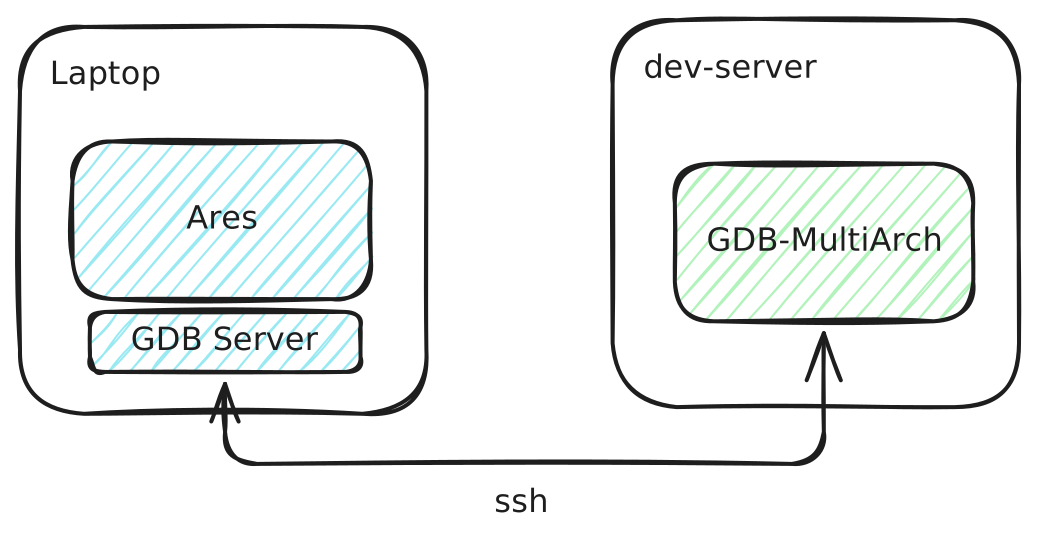
With that background out of the way, here’s the workflow I actually use. It consists of three key components:
- gdb-multiarch: GDB needs no introduction. It’s been the dominant debugger in the C/C++ ecosystem for decades.
gdb-multiarchis a variant compiled with support for multiple architectures, which we need because the N64 uses a MIPS CPU rather than the architecture most modern machines run. - Ares: Ares is an emulator for the N64 (amongst other platforms) with a focus on cycle accuracy. Many N64 emulators take shortcuts for performance, but for decompilation we’re happy to trade speed for fidelity. Most importantly for our use case, Ares supports remote debugging with GDB.
- SSH (optional): I usually do development on an x86 Ubuntu server rather than my M-series Mac for better tooling compatibility, so I need an SSH tunnel to connect my GDB client and server.
Set up Ares
Ares works like most emulators: load your ROM and run it. It doesn’t really matter whether this is the original ROM or one built from your decompilation project; by definition, every byte should be identical. The default debug settings are fine; just make sure debugging is enabled.
Set up SSH Tunnel
You may not need this step, depending on your setup. Since I am running GDB on a remote server, I need a reverse tunnel so it can connect back to Ares:
1ssh -R 1235:localhost:1235 dev-server
Connect GDB to Ares
Start GDB; this can be done anywhere, but it’s often convenient to do so from the root of the project:
1gdb-multiarch
Set the architecture to something close to the N64’s CPU architecture. GDB doesn’t have first-class Nintendo 64 support, but this is sufficient for our needs:
1set arch mips:4000
Point GDB at the ELF produced by the decompilation project:
1file build/snowboardkids2.elf
Then connect to Ares:
1target remote :1235
Our setup is complete. Thankfully, even without full debug information, the ELF contains enough symbol data for us to break on functions by name:
1(gdb) b func_800BB2B0_B4240
2Breakpoint 1 at 0x800bb2b0
Ares will now pause execution. Use c to continue until the breakpoint is hit.
Finding Jingle Town
With the tooling in place, we can now return to the original question: how does the game decide which level overlay to load?
I recently came across a function named func_8003D560_3E160 (an automatically generated name) that appeared to be loading one of 16 overlays.1 That number is suspiciously close to the number of levels in Snowboard Kids 2, which suggests that the overlay index might correspond to the currently loaded level.
In very simplified form, the function looks like this:
1func_8003D560_3E160() {
2	Overlay *overlayConfig = &Overlays[D_800AFE8C_A71FC->unk7]
3}
D_800AFE8C_A71FC is a global variable. unk7 is an unsigned char located 0x6 bytes from the start of that structure (i.e. the 7th byte).3 That’s enough information to work with for now.
This is not much information, but it’s enough to form a testable hypothesis: if this function is responsible for loading level data it should get called when we enter a new level. And if unk7 represents the current level index, its value should change predictably as different levels are loaded.
To test this, we add a breakpoint and resume execution:
1(gdb) b func_8003D560_3E160
2Breakpoint 2 at 0x8003d564 # remember we set a breakpoint earlier!
3(gdb) c
4Continuing.
Next, we load the first level of the game: Sunny Mountain:
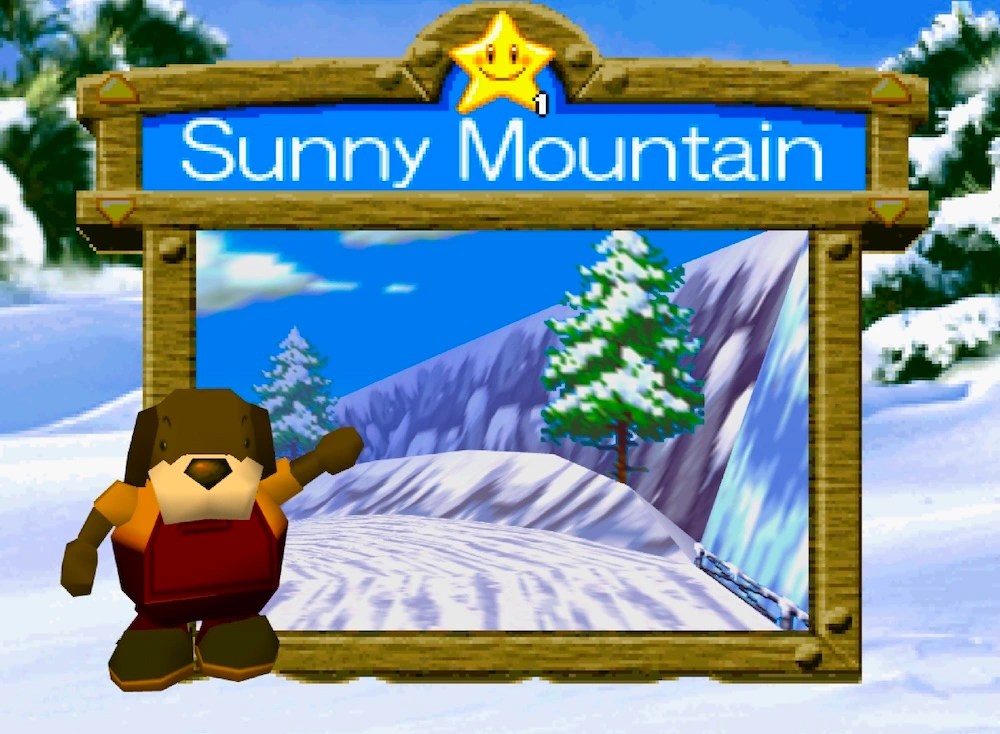
Execution immediately stops at the breakpoint:
1Breakpoint 2, 0x8003d564 in func_8003D560_3E160 ()
2(gdb)
Since GDB does not know the structure layout, we manually inspect the relevant byte:
1(gdb) p *((unsigned char*)D_800AFE8C_A71FC + 0x7)
2$1 = 0 '\000'
This is encouraging! If level indices start at zero, Sunny Mountain appears to correspond to index 0. To be sure, we check a few more levels:
1(gdb) p *((unsigned char*)D_800AFE8C_A71FC + 0x7)
2$2 = 1 '\001' # Turtle Island
3(gdb) c
4Continuing.
5(gdb) p *((unsigned char*)D_800AFE8C_A71FC + 0x7)
6$3 = 2 '\002' # Jingle Town
The pattern holds! This function is indeed loading code specific to the level being played, along with a whole bunch of other level initialisation logic.
Potential Improvements
This workflow is effective but painfully manual. Short of being able to run a build with debug symbols, having a more visual debugging experience would be nice. I experimented with gdbgui, but didn’t have much luck getting it to work with my setup.
I also wonder whether it would be possible for a debugger to reference externally generated debug symbols without altering the binary itself. It doesn’t seem impossible in theory, even if it isn’t something GDB supports in practice (as far as I can tell).
That said, it’s genuinely satisfying to see the Snowboard Kids 2 decompilation reach a point where we can reason about higher-level game behaviour, like level initialisation, rather than just individual instructions. If you’ve made it this far, you probably have an interest in decompilation, debugging, and the unequalled brilliance of Snowboard Kids 2. Check out the Snowboard Kids 2 decompilation project, and feel free to reach out on Discord if you’re interested in helping.
You can also follow me on Bluesky for more Snowboard Kids 2 updates.
Footnotes
On the N64, overlays are chunks of code that are loaded and unloaded at runtime to save memory. ↩︎ ↩︎
This is a deep rabbit hole. Compiled binaries typically use a standard debug encoding format called DWARF. Early approaches used hash tables for symbol mappings, but these massively inflated binary size, something that still matters even on modern systems. There’s also some fun lore: DWARF gets its name from the fictional creature (think Gimli), intended as a companion to the ELF binary format (think Legolas). ↩︎
If you’re curious about the full function, you can find it here. ↩︎